Video panel

Overview
In the VIDEO panel you can configure your turntable videos.
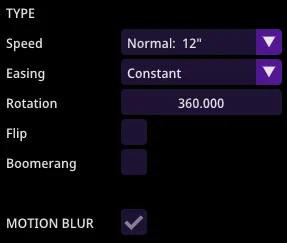
Speed
This attribute controls the total duration of your turntable video.
| Value | Duration |
|---|---|
| Very Fast | 3" |
| Fast | 6" |
| Normal | 12" - recommended |
| Slow | 18" - recommended |
Motion
This attribute controls the way in which the rotation will happen.
| Value | Type of motion |
|---|---|
| Constant | Uniform rotation speed |
| Ease in/out | Gradual start/stop |
Rotation
Total degrees of turntable sweep (e.g., 360 for full rotation).
Flip
Rotation direction: Clockwise vs. Counter-clockwise.
Boomerang
Reverse rotation at end of sweep.
Motion blur
Toggle on/off for cinematic effect.